Have you just launched your new interior design biz and need a website? Or maybe you need a refresh?
HEY INTERIOR DESIGNERS
Did you know that in a recent YouGov survey 83% of consumers said that they would not engage with a business that didn’t have a website?

Confused about whether you should hire a web designer or if you have the skills to DIY?
There are many things to consider. In this training I’ll walk you through some of the most commonly asked questions that interior designers ask about websites and website design.
Are you getting conflicting advice from a variety of sources - with website designers pushing their own platforms?

Have you heard that web design is hard?
WordPress or Wix? Squarespace, Elementor or Showit? I worked with them all.
I listened to loads of conflicting advice with designers promising all manner of miracles.
They made designing a website sound really hard.
I believed them.
Now, I’m not suggesting that it’s easy.
An interior designer needs just 6 pages: a Home page, About page, Projects Page, Press and PR page and a Contact page.
That’s it. Connect your social media, add in a few testimonials and you’re done!
A website is just a container for your content.
Okay- that doesn’t sound too hard.
But that isn’t the full story
What about all the stuff that goes inside the container?
The copy, the images, the functionality?
Will a website designer do this? How will they know what to write? How can they make my website distinctive and unique so that I stand tall in the crowd?
What if I want to change something? I might want to add in a new service. Or change my prices. Or write about a new project? How does that happen? How fast can they do it?
…not sure you want to spend thousands on a website that may not serve your ideal clients…
WHAT HAPPENS IF YOU ARE
AND HAS A SHELF LIFE OF AROUND 2 TO 5 YEARS?
Let’s face it…
There’s so much more you need when you start up a new biz. Professional photography, new tech (hello Apple Studio), that cool chair, it all adds up.
Your designs are pretty great and you don’t want to distract from them.
You are REALLY busy and you need that website, yesterday.
You’re going to grow as an interior designer, will your site grow with you?

Watch the free training for interior designers that answers all your questions and more…
Let me walk you through all the factors you should consider about your interior design website and, if you are considering hiring a designer, how to find one that suits you!
✨ IN THIS TRAINING
✨ IN THIS TRAINING
We’ll talk about….

The website you want
Where do I start? It’s all so confusing and techy and everyone is telling me different things…

What is a CMS?
What is a content management system ? Why do I need one? What’s the big deal anyway?

How to choose a CMS?
How do I choose the CMS for me?
How much should I spend?
So how much does a website cost? What do I get if I spend more? What do I get if I spend less?
How do I get my website to suit me?
Tailor your website to your unique style & voice so that you can effectively tell your brand story.
Strategic website design
Design a strategic website that saves you time by filtering out less than ideal clients by embedding email forms, schedulers, links to client portals.
⭐️The Website You Want
⭐️What is a CMS?
⭐️How to Choose a CMS
⭐️How much to spend?
⭐️How to get my website to suit me?
⭐️Strategic Website Design
Hi! I’m Joanne
I’m an interior designer just like you
Ever heard the saying:
“Give a man a fish, and you feed him for a day. Teach a man to fish, and you feed him for a lifetime.”
If you are anything like me, you have been frustrated by how much a website costs and how limiting it can be. As designers, we are able to imagine the ephemeral. We are great with colour and proportion. We love textures. We push the boundaries and find beauty in the unexpected.
I hated feeling that I was unable to make minor design changes to my site & how long it took to get a website project off the ground. I needed a website that could showcase my growing list of projects and that helped me get my ideal clients.
After managing the blog pages on my previous WordPress sites, I knew I wanted to be able to one day design my own website, but the thought of learning code made my head spin.
I started another website using Squarespace and though there is a learning curve , its design functionality allows you to really customise your pages.
I’ve put together a course called Website in a Weekend which is being beta tested.
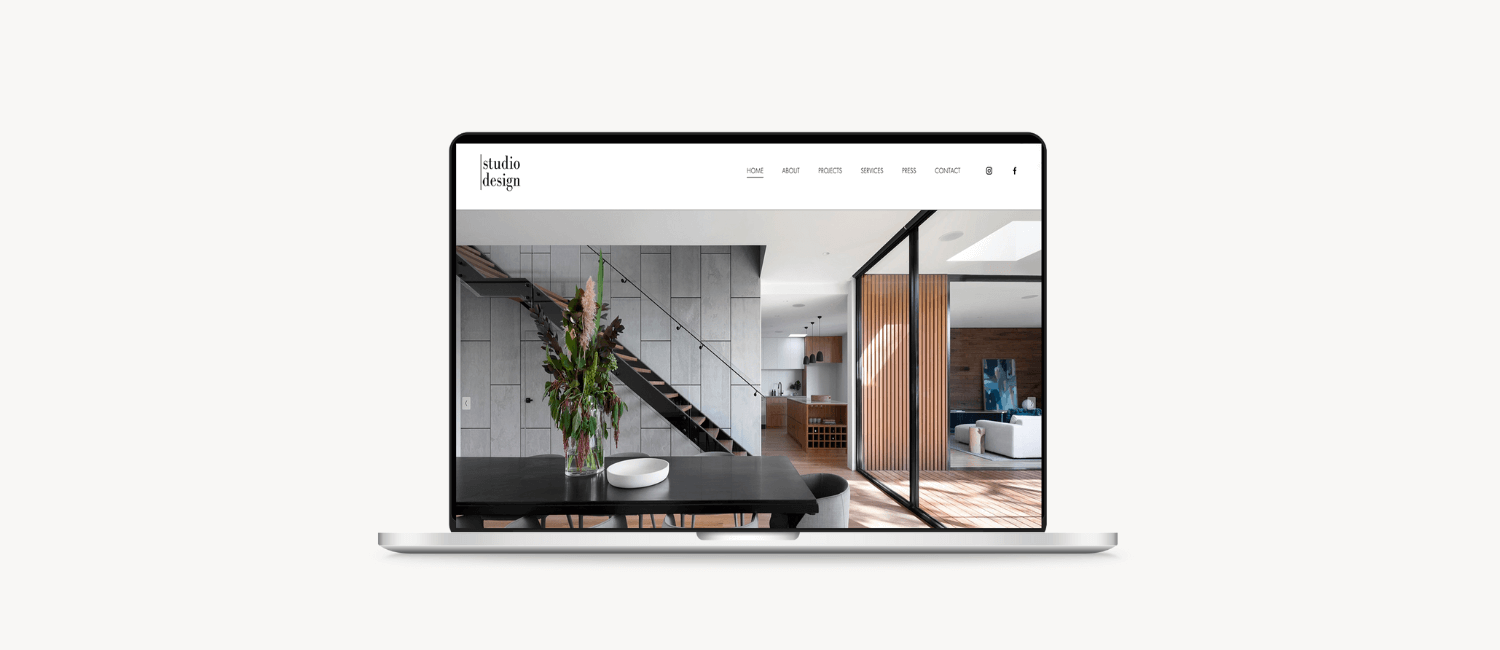
In this course, I’ll help you build an interior design website that will help you stand out and sell. With a bit of knowhow you’ll be able to design an amazing website. Check out this site- made on Squarespace and by yours truly.


How It Works
Fill out
Use the worksheets to get your branding, logo and copy together

Follow along
Watch the step-by-step videos and build your website alongside
Customise
Change up the palette, connect socials and apps
Launch
You have a website to be proud of and you built it all by yourself
unlock everything you need to launch your website!

Check out the course trailer
A short introduction to Website in a Weekend. Learn how to build a site in Squarespace from scratch!
Think you can’t do it? Too “techy”?
I believe that as designers we have the technical skill already to learn the principles of website design and build our own. We understand design and we have firm opinions on what looks good.
Website design is not much different.
This is just a MINDSET. You can do it!
Say ‘bye’ to this mentality!
Wouldn’t it just be easier to get a web designer to do it for me?
Well yes… and no….
Even if you engage a web designer, you still have to tell them what you want. You still have to give them the copy. engage a copywriter or write it yourself. You still have to get professional images that will showcase your work. This all takes time…and effort.
And after all that, you may have a beautiful website that hopefully you are happy with…
But ….
What happens when you want to tweak your website a bit?
This is where Website in a Weekend comes in…
Need to upload images that are optimised and SEO-friendly, change the copy a bit, add in a scheduler or link your email list? Do you know how to drive traffic to your site with SEO?
With Website in a Weekend
Build a website with ease
No going down the YouTube rabbit hole! Confidently build your website from scratch. You will learn tech skills and principles of website design.
Manage your own site
Be able to manage all your content on your website yourself. Change images, backgrounds, set up and manage your blog yourself. Add pages and style these pages with your branding, creating a consistent identity.
Showcase your designs
Design a strategic website that showcases your designs rather than distracts. Your website will enhance your brand, fitting your aesthetic vision perfectly!

let’s take a look inside
WEBSITE IN A WEEKEND
PDF WORKSHEETS AND NOTION TEMPLATES
You may have your own branding, but if you don’t - we can build a simple brand identity together. The worksheets will help you identify your ideal client and help you put together your branding that will attract. We will go through the elements of branding, and suggestions for writing the copy & selecting images.
VIDEO TRAINING
Never used a website builder? No problem!
I’ve got you covered with step-by-step video series, taking you from buying your domain right through to the launch
STRATEGY BLUEPRINTS
We’ll take a deep dive into the most common types of websites for interior designers so that you can identify what suits your business the best.
Tell me more…
the results you are going to get:
You understand the important pages of a website for an interior designer and how to build them
Write awesome copy for your website that attracts your ideal client
You are able to link up your email newletter provider, social links and calendar app. You will even be able to take payments for your design consults
As website styles change you will be able to adapt your website to suit- quickly and easily
You will understand the basics of SEO and image optimisation and be able to implement it on an ongoing basis
Focus on designing awesome interiors, rather than worrying about your website

Don’t have a logo (or need a refresh?), no colours? No problem! I’ll take you step by step and help you put together your branding and logo- ready for Squarespace. Check out the free training here to find out more.

Branding for Interior Designers
The Website in a Weekend Road Map

Implement quickly

Follow me step-by-step

Develop a website that truly shows off your talent

I believe that you can achieve anything you want, creating the life you desire AND build the business of your dreams, just by TAKING THE FIRST STEP
FAQs
-
In this course, we will build your website from scratch. You will have control of every aspect of how your website looks and feels. It means we will dive right into the back of Squarespace.
-
Yes, even if you already have a design, we will explore everything you can change in Squarespace without code, so you should be able to change up a few things: colors, fonts, images, add pages and sections and make it your own.
-
Everything is possible, depending on how your website was set up and who holds the passwords for your site setup. Squarespace has a detailed document here: https://support.squarespace.com/hc/en-us/articles/115006390227-Moving-an-existing-site-to-Squarespace. I’d read this and see if it is possible. Please verify before you buy this course, as I may not be able to help you on this technical stuff.
-
No! We will be working within the confines of Squarespace’s user interface. If you want to upload custom fonts, you may have to upload a tiny bit of code… but I suggest we use Google fonts and keep it simple (and free!).
-
This course is suitable for anyone who uses a lot of images and provides a service. I can see use cases for landscape architects, artists, product designers. The principles I will teach you will be able to applied to any website in Squarespace.
Forget about being tied to one design and having to work out how to customise it to your needs. You already have a great design sense and know how to put images together with text. Squarespaces’ flexible platform gives you the ability to be in the driver’s seat and you don’t have to pay for design skills YOU ALREADY HAVE.
This course is different because…..

IT IS NOT A TEMPLATE & YOU CAN DESIGN THE SITE HOWEVER YOU WANT
For the price of a template design, you will be able to build as many websites as you wish! Build one or build ten…this course will help you enter into the world of web design and allow you to launch quickly. After spending some time working in Squarespace, you will be able to see its full possibilities and you can always come back and make changes- quickly and easily!
It costs a fraction of a custom design

No delving into the rabbit warren that is YouTube, trying to piece together code and customisations. This course will SCALE your website into something fresh and new that no-one else will have. You can have EVERYTHING on your site, progress pages, portfolio pages, team pages and a blog. You could even link a Shopify store or later run memberships and courses. The world (or should I say website) is your oyster!

Step-by-step instructions

You want THIS to be the year that you FINALLY:
✔️ Launch your new website
✔️ Build a website that you can truly customise
✔️ Create a branding that will attract your ideal client
✔️ Use the money you’ve saved to invest in really great photography of your work
✔️ Link together your brand, website and social to really create that business of your dreams
✔️ Feel confident, in control and less dependent on the whims of a web designer
✔️ Align your website to attract your ideal client
You know your business better than anyone else and that makes you the perfect designer of your website
So what are you waiting for?
LET’S DO THIS THING!